Reading editorial briefs
A brief is the unit of value in Content Marketing Ideas. It pitches a piece of content worth writing — not just a headline, but the angle, the gap it fills, the keywords it can win, and what competitors have already published.
The brief list
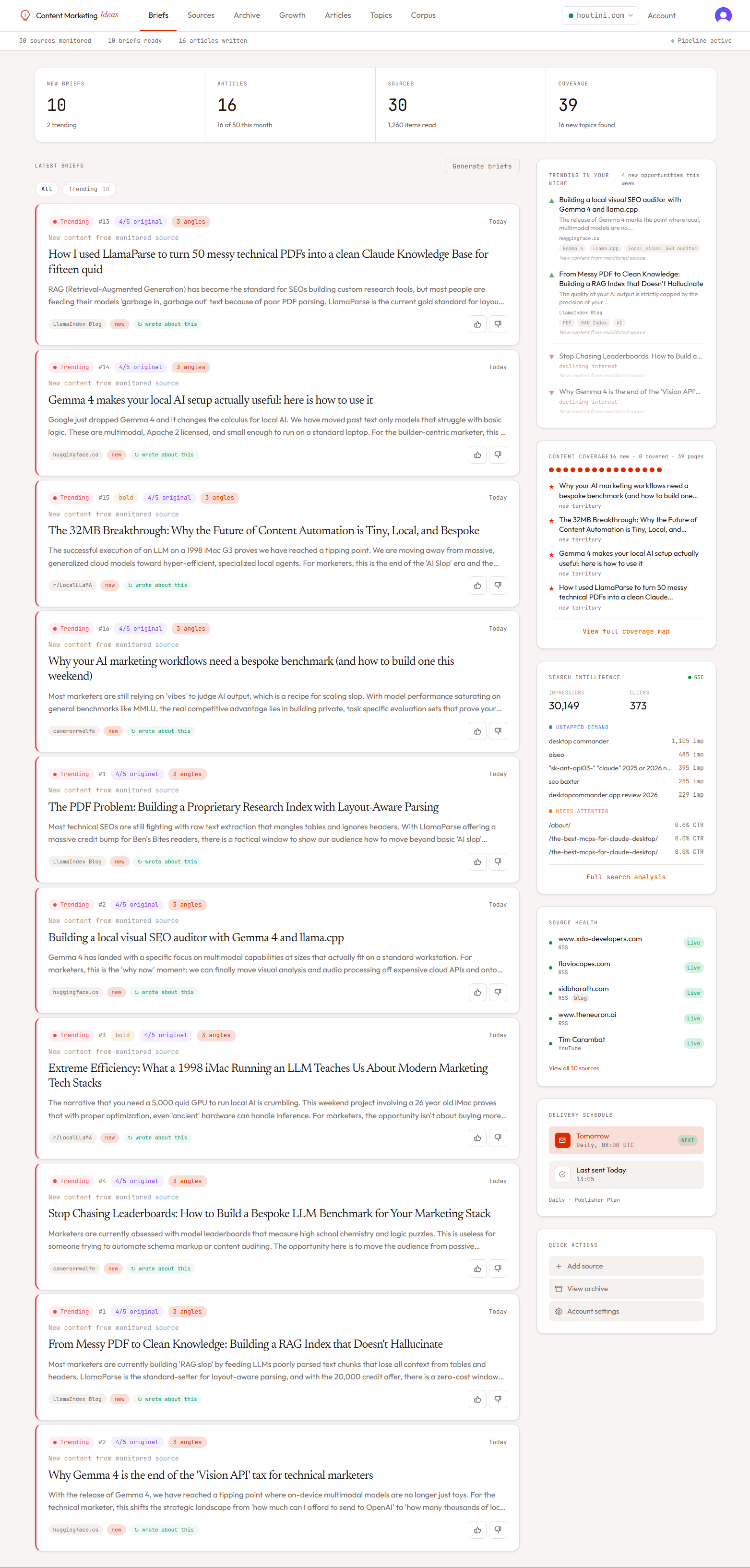
The dashboard shows your latest briefs as cards. Each card surfaces the core signals at a glance:
- Topic — the editorial headline.
- Signal type badge — trending, decay, untapped, gap, or seasonal.
- Angle type — obvious, bold, or contrarian. Different angles for different editorial appetites.
- Originality score — 1 to 5 stars. Scored by Gemini against the competitive landscape we pulled live.
- Trending direction — rising, stable, or declining momentum.
Inside a brief
Click any brief to open the detail page. Briefs are organised top-down from "what to write" to "evidence backing it up."
Thesis and editorial play
The thesis is a single sentence stating the angle. The editorial play tells you how to position the piece — for example "Frame this as a counter-argument to the prevailing tutorial-style coverage. Lead with a contrarian hook, then back it up with the data."
Gap
What's missing in existing coverage. This is where the piece earns its right to exist — if there's no gap, originality scores low and you should probably skip it.
Alternative angles
Every brief comes with two extra angles in addition to the primary one. They're tabbed as obvious / bold / contrarian. If the lead angle doesn't fit your voice, click through and the rest of the brief reframes around the alternative.
Keyword data
Pulled live from DataForSEO. For each relevant keyword we show monthly search volume, the 12-month trend sparkline, difficulty (a coloured dot), and CPC. These are the keywords the piece should target.
Topic momentum
A larger sparkline showing the primary keyword's normalised search interest over the last 12 months. Direction is classified as rising, stable, or declining. Use this to time your publishing — rising momentum means the audience is searching now.
Competitive landscape
We run a SERP query and a YouTube search, then summarise: how many written guides exist, their average quality and age, and what video coverage is out there. This is the evidence behind the originality score.
People Also Ask + related searches
Pulled from the live Google SERP. These are the questions to answer in your piece — they map directly to H2s and FAQ sections.
Entities
Named entities extracted by Gemini and resolved to Wikidata QIDs where possible. Each entity is tagged as core, supporting, or tangential. Use these for internal linking and structured data markup.
Related own content
If your corpus contains pages relevant to this brief, they're listed here with a relevance note. This is how you avoid cannibalising your own content — and where to add internal links from when the new piece is published.
Filtering and search
The briefs page supports filtering by signal type, angle type, minimum originality score, and free-text search across topic titles. Use this to find the bold contrarian angles when you want a swing-for-the-fences post, or the high-originality decay signals when you need a defensive refresh.
Feedback
Every brief has thumbs up / thumbs down buttons plus Made this and Already covered actions. Feedback feeds into the next synthesis run — briefs you mark "already covered" reduce the chance of similar topics appearing, and thumbs up boosts the angle type you signalled enthusiasm for.
Sharing and exporting
Click the share button to generate a public share token — you can send the brief to a freelancer or editor without giving them dashboard access. There's also a PDF export with your site's branding.