Adding sources
Sources are the feeds Content Marketing Ideas monitors to find what your audience is reading, watching, and asking about. The more relevant sources you add, the sharper your briefs become.
Smart Paste
The fastest way to add a source is the Smart Paste box at the top of the Sources page. Paste any URL and click Detect — the system identifies the source type, finds the feed URL, and shows you a preview of recent items before you confirm.
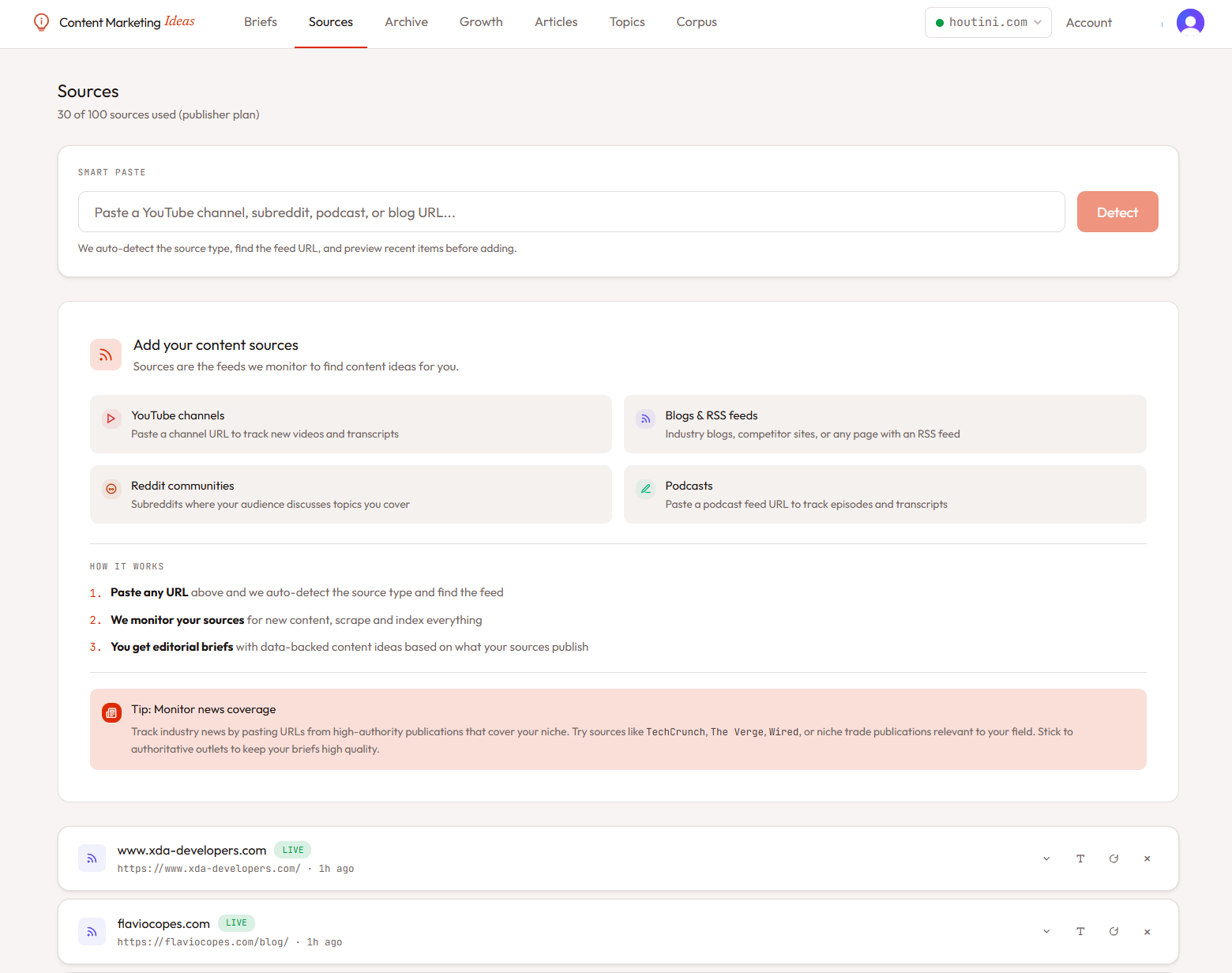
Source types
RSS feeds
The bread and butter. Any blog with an RSS feed can be a source. You can paste either the feed URL directly (example.com/feed.xml) or just the homepage — Smart Paste will auto-discover the feed via <link rel="alternate"> tags.
What gets ingested: title, URL, summary, published date. The scraper then fetches the full article body for each item via Supadata, with Firecrawl as a fallback.
YouTube channels
Paste a channel URL (youtube.com/@channelname or youtube.com/channel/UCxxx). The system pulls the channel's video feed and uses Supadata to fetch transcripts for each video, so synthesis can read what was actually said — not just the title.
@handle URLs sometimes fail to resolve from inside Cloudflare Workers. If detection fails, paste the full /channel/UCxxx URL instead.
Reddit communities
Paste a subreddit URL (reddit.com/r/subreddit). The ingestion worker calls Reddit's JSON API directly to pull recent threads, including the self-text and the top 10 comments. Great for capturing what your audience is actually arguing about.
Podcasts
Paste a podcast RSS feed (the same URL you'd use in Apple Podcasts or Overcast). The system parses episode metadata and uses Supadata to generate transcripts on demand — so a 60-minute episode becomes searchable text the synthesis worker can use.
News alerts
News sources are different — instead of a feed URL, you give them keywords. The system constructs a Google News RSS query for each keyword and pulls matching articles every hour.
Example keywords for a SaaS analytics blog:
"product analytics""customer data platform""warehouse-native analytics"
Wrap multi-word phrases in quotes for exact-match — Google News honours the same operators as regular Google search.
SEO or marketing will flood you with low-relevance items. Stick to distinctive phrases that high-authority publications would actually use in headlines.
Tagging and filtering
Each source can have tags applied (competitor, industry-news, community). Tags don't affect synthesis directly but help you organise the source list and reset selectively. You can also add per-source keywords to filter incoming items — only items matching at least one keyword will be ingested.
Indexing into your corpus
For RSS feeds and podcasts, you can optionally index the full archive into your corpus. This populates the RAG knowledge base so synthesis can cross-reference what your sources have already covered when generating briefs and articles.
Click the index button on a source row to trigger a one-off crawl. Status updates as it runs (pending → indexing → indexed).
Source health
Sources can enter an error state if their feed becomes unreachable (404, malformed XML, or YouTube's anti-bot blocking). The dashboard shows a red dot next to broken sources. You can edit the URL to fix it, or delete the source.
Plan limits
- Free: 5 sources, weekly briefs
- Pro: 25 sources, daily briefs
- Business: 50 sources across 5 sites
- Publisher: 100 sources across 10 sites